 BanyanDB
Quick Start Tutorial
The following tutorial will guide you through setting up a SkyWalking OAP with BanyanDB as the storage backend using Docker Compose. It is a quick way to get started with BanyanDB if you are a SkyWalking user and want to try out BanyanDB.
Option 1: Use the Docker Compose Example (Recommended)
This repository includes a ready-to-use docker-compose file at docker-compose.yaml that sets up:
- BanyanDB - Standalone instance with property-based schema registry
- SkyWalking OAP - Configured to use BanyanDB as storage
- SkyWalking UI - Web interface for visualizing traces, metrics, and topology
- Demo Services - Sample microservices that generate trace traffic automatically
Prerequisites
- Docker Engine 20.10+
- Docker Compose v2.0+
Quick Start
-
Navigate to the quick-start directory:
cd docs/guides/quick-start -
Start the stack:
docker compose up -d -
Wait for all services to be healthy (may take 1-2 minutes):
docker compose ps
Accessing the Services
| Service | URL | Description |
|---|---|---|
| SkyWalking UI | http://localhost:8080 | Web interface for traces, metrics, topology |
| BanyanDB HTTP | http://localhost:17913 | HTTP endpoint for bydbctl and embedded UI |
| BanyanDB UI | http://localhost:17913 | Embedded UI for querying data |
| OAP HTTP | http://localhost:12800 | OAP REST API |
| OAP gRPC | localhost:11800 | gRPC endpoint for agents |
Verifying the Setup
-
Check BanyanDB is healthy:
nc -z localhost 17913 -
Check OAP is healthy:
docker logs skywalking-oap 2>&1 | grep "Health status" -
View traces in SkyWalking UI:
- Open http://localhost:8080
- Go to “General” > “Service” to see the demo services
- Go to “Traces” to view trace data
Configuration
The docker-compose.yaml includes environment variables for customization:
# BanyanDB configuration
command: standalone

# SkyWalking OAP with BanyanDB storage
environment:
  SW_STORAGE: banyandb
  SW_STORAGE_BANYANDB_TARGETS: banyandb:17912

  # Enable VM metrics collection
  SW_OTEL_RECEIVER: default
  SW_OTEL_RECEIVER_ENABLED_OC_RULES: vm
  SW_OTEL_RECEIVER_ENABLED_OTEL_METRICS_RULES: vm
Environment Variables
You can customize the deployment using environment variables:
# Use specific image versions
BANYANDB_IMAGE=apache/skywalking-banyandb:0.9.0 \
OAP_IMAGE=apache/skywalking-oap-server:10.3.0 \
OAP_UI_IMAGE=apache/skywalking-ui:10.3.0 \
docker compose up -d
Stopping the Stack
docker compose down
To also remove data volumes:
docker compose down -v
Option 2: Use SkyWalking Showcase
Clone the showcase repository to use their pre-configured demo:
git clone https://github.com/apache/skywalking-showcase.git
cd skywalking-showcase
Start the showcase cluster:
make deploy.docker FEATURE_FLAGS=single-node,agent
You could find the details of the showcase cluster in the SkyWalking Showcase
Data Presentation
Using Docker Compose (Option 1)
Access the UIs at:
- SkyWalking UI: http://localhost:8080
- BanyanDB UI: http://localhost:17913
Using Showcase (Option 2)
- SkyWalking UI: http://localhost:9999
- BanyanDB UI: http://localhost:17913
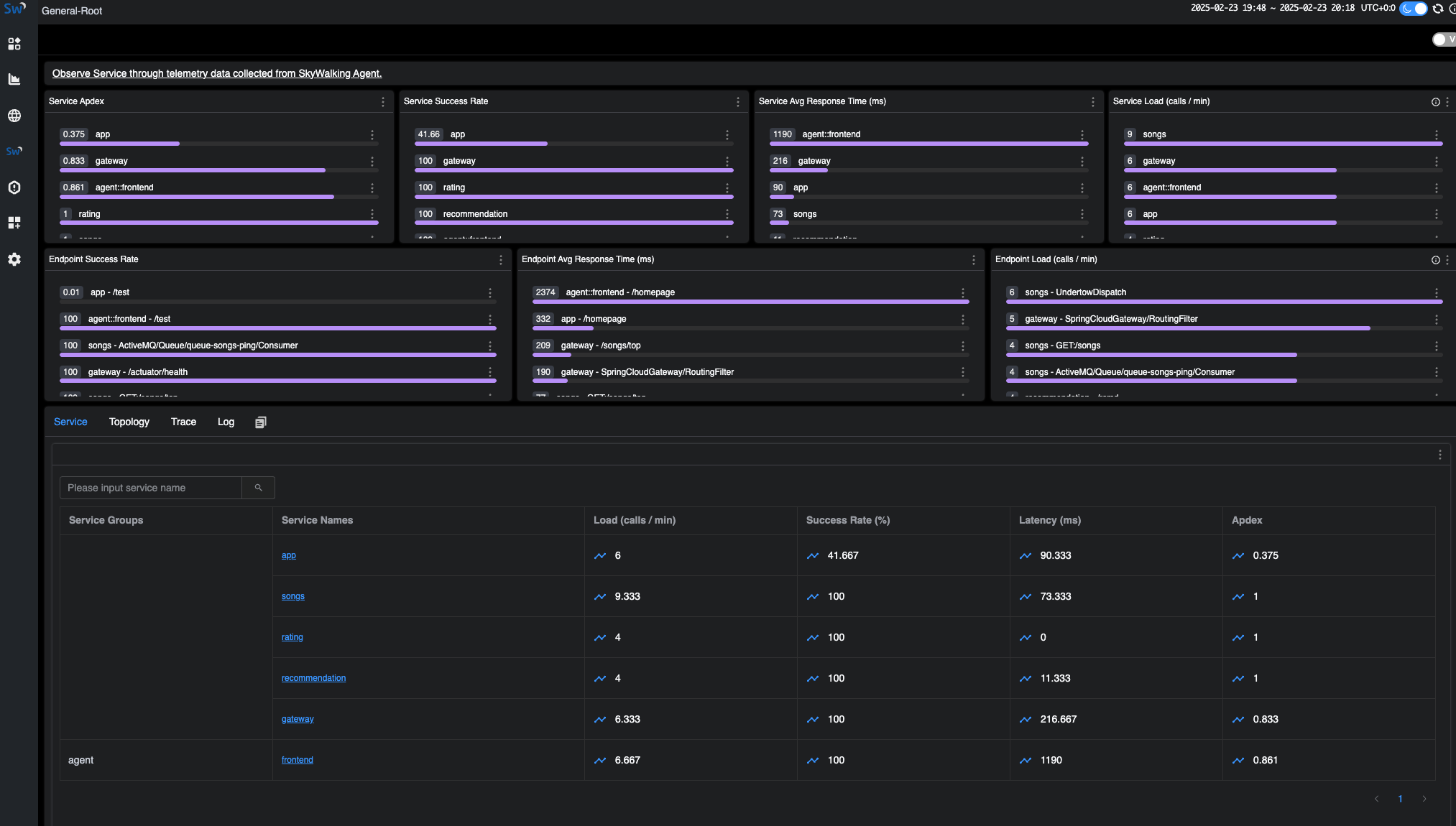
We can view the final presentation of the metrics/traces/logs/topology for the demo system on the UI dashboards.
The following image shows the General-Service service list in the SkyWalking UI:
Query the Data in BanyanDB
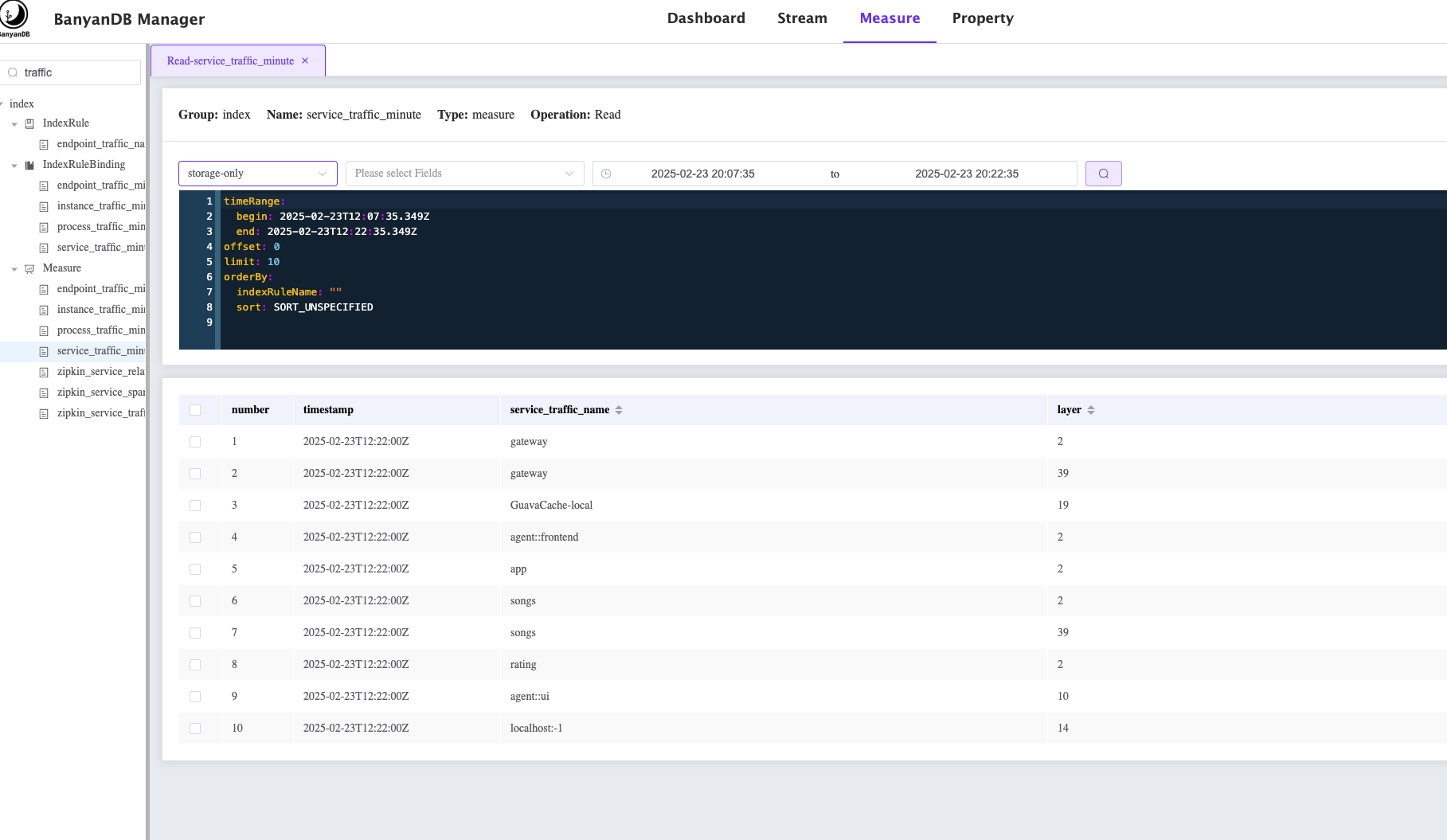
If you are interested in the raw data stored in BanyanDB, you can use the BanyanDB embedded UI or BanyanDB CLI(bydbctl) to query the data.
- BanyanDB embedded UI can be accessed at
http://localhost:17913. The following image shows how to query all the services from the BanyanDB:
- BanyanDB CLI(bydbctl) can be used to query the data from the command line.
bydbctl measure query -f - <<EOF
name: "service_traffic_minute"
groups: ["index"]
tagProjection:
  tagFamilies:
    - name: "default"
      tags: ["service_id", "short_name","layer"]
EOF
We can see the following output:
dataPoints:
- fields: []
  sid: "6694704579998440084"
  tagFamilies:
  - name: default
    tags:
    - key: service_id
      value:
        str:
          value: Z2F0ZXdheQ==.1
    - key: short_name
      value:
        str:
          value: gateway
    - key: layer
      value:
        int:
          value: "2"
  timestamp: "2025-02-23T12:36:00Z"
  version: "9017360854805676"
- fields: []
  sid: "2264252405119611112"
  tagFamilies:
  - name: default
    tags:
    - key: service_id
      value:
        str:
          value: R3VhdmFDYWNoZS1sb2NhbA==.0
    - key: short_name
      value:
        str:
          value: GuavaCache-local
    - key: layer
      value:
        int:
          value: "19"
  timestamp: "2025-02-23T12:36:00Z"
  version: "9017360854808916"
- fields: []
  sid: "7200167536615717650"
  tagFamilies:
  - name: default
    tags:
    - key: service_id
      value:
        str:
          value: Z2F0ZXdheQ==.1
    - key: short_name
      value:
        str:
          value: gateway
    - key: layer
      value:
        int:
          value: "39"
  timestamp: "2025-02-23T12:36:00Z"
  version: "9017360854811805"
- fields: []
  sid: "11101904457842605307"
  tagFamilies:
  - name: default
    tags:
    - key: service_id
      value:
        str:
          value: YWdlbnQ6OmZyb250ZW5k.1
    - key: short_name
      value:
        str:
          value: frontend
    - key: layer
      value:
        int:
          value: "2"
  timestamp: "2025-02-23T12:36:00Z"
  version: "9017360854814505"
- fields: []
  sid: "16886997253576549432"
  tagFamilies:
  - name: default
    tags:
    - key: service_id
      value:
        str:
          value: c29uZ3M=.1
    - key: short_name
      value:
        str:
          value: songs
    - key: layer
      value:
        int:
          value: "2"
  timestamp: "2025-02-23T12:36:00Z"
  version: "9017360854817476"
- fields: []
  sid: "3060777112302363794"
  tagFamilies:
  - name: default
    tags:
    - key: service_id
      value:
        str:
          value: YXBw.1
    - key: short_name
      value:
        str:
          value: app
    - key: layer
      value:
        int:
          value: "2"
  timestamp: "2025-02-23T12:36:00Z"
  version: "9017360854820076"
- fields: []
  sid: "3424504874722446951"
  tagFamilies:
  - name: default
    tags:
    - key: service_id
      value:
        str:
          value: c29uZ3M=.1
    - key: short_name
      value:
        str:
          value: songs
    - key: layer
      value:
        int:
          value: "39"
  timestamp: "2025-02-23T12:36:00Z"
  version: "9017360854823045"
- fields: []
  sid: "7814002932715409293"
  tagFamilies:
  - name: default
    tags:
    - key: service_id
      value:
        str:
          value: cmF0aW5n.1
    - key: short_name
      value:
        str:
          value: rating
    - key: layer
      value:
        int:
          value: "2"
  timestamp: "2025-02-23T12:36:00Z"
  version: "9017360854827145"
- fields: []
  sid: "4722671161330384377"
  tagFamilies:
  - name: default
    tags:
    - key: service_id
      value:
        str:
          value: YWdlbnQ6OnVp.1
    - key: short_name
      value:
        str:
          value: ui
    - key: layer
      value:
        int:
          value: "10"
  timestamp: "2025-02-23T12:36:00Z"
  version: "9017360854831856"
- fields: []
  sid: "5033399348250958164"
  tagFamilies:
  - name: default
    tags:
    - key: service_id
      value:
        str:
          value: bG9jYWxob3N0Oi0x.0
    - key: short_name
      value:
        str:
          value: localhost:-1
    - key: layer
      value:
        int:
          value: "14"
  timestamp: "2025-02-23T12:36:00Z"
  version: "9017360854839325"
- fields: []
  sid: "6492992516036642565"
  tagFamilies:
  - name: default
    tags:
    - key: service_id
      value:
        str:
          value: MTcyLjE5LjAuNDo2MTYxNg==.0
    - key: short_name
      value:
        str:
          value: 172.19.0.4:61616
    - key: layer
      value:
        int:
          value: "15"
  timestamp: "2025-02-23T12:36:00Z"
  version: "9017360854846096"
- fields: []
  sid: "724075540118355969"
  tagFamilies:
  - name: default
    tags:
    - key: service_id
      value:
        str:
          value: cmVjb21tZW5kYXRpb24=.1
    - key: short_name
      value:
        str:
          value: recommendation
    - key: layer
      value:
        int:
          value: "2"
  timestamp: "2025-02-23T12:36:00Z"
  version: "9017360854850545"
trace: null